Technology
Can You Really Trust an AI Detector? Here Is What I Learned the Hard Way

Ever pasted your own 100% human-written essay into a checker and watched it scream 68% AI-generated? Yeah me too. And honestly that moment kind of broke my brain a little.
We are at this weird point where more people are writing with AI help than ever before and at the same time teachers and editors and clients are all scrambling to figure out what is real writing and what is not. So naturally a whole industry popped up around AI detection tools promising to tell you with total confidence whether a piece of text came from a human or a machine.
Except they do not always get it right. Not even close sometimes.
I have spent way too many late nights messing around with these things. Running my own writing through them just to see what happens. Running obviously AI text through them too and comparing the results across a bunch of the big name platforms. Getting frustrated more than once. Googling why does this detector think I am a robot at 1am like some kind of sleep deprived detective. So I figured I would just write down what I actually found because I think a lot of people are confused about this and nobody is giving them the straight unglamorous version.
So What Even Is an AI Detector Really
At the core an AI detector tool is just a model trained to spot patterns that show up more often in machine generated text. Stuff like unusually consistent sentence structure or predictable word choices or low burstiness which is basically how much your sentence lengths vary from one to the next. There is also this certain flatness in tone that AI models tend to fall back on and detectors are trained to sniff that out too.
The bigger platforms out there do not just spit out a single percentage anymore either. A lot of them now highlight the exact sentences they think are AI written and try to break down the reasoning behind the flag and even guess which model the text might have come from. Sounds impressive on paper. In practice it is still a lot of educated guessing dressed up as precision if you ask me.
The problem is real humans do this too sometimes. Technical writers. Non native English speakers. People who just naturally write clean and formal. They all get flagged constantly and it is not because anyone is doing anything wrong. It is just that the tech is not nearly as smart as the marketing wants you to believe.
A few things I noticed while testing a bunch of these tools
- Short text under 250 to 300 words gives wildly unreliable results so do not trust a verdict on a tweet length paragraph. Most platforms actually need a minimum character count before they will even give you a real score anyway.
- Heavily edited AI text where a human goes in and rewrites chunks of it often slips right past detectors without a hitch.
- Formal academic writing gets flagged as AI way more than casual writing does even when a person wrote every single word of it themselves.
- Grammar tools that use AI under the hood for rewriting suggestions can sometimes get your document flagged too even if you never once opened ChatGPT.
Why the Same Text Gets Wildly Different Scores on Different Tools
Okay here is the thing nobody tells you upfront. Run the exact same paragraph through three or four different detectors and you will get three or four different answers. I am not exaggerating even a little. One will say 12% AI. Another will say 74%. And a third will just shrug and say mixed like it is throwing its hands up.
Why does this happen? Because every detector is trained on a different dataset and weighs different signals and sets its own thresholds for what even counts as AI like in the first place. Some lean heavily on sentence rhythm while others care more about word choice frequency. None of them are looking at the exact same thing which is honestly kind of wild once you realize how much weight people put on these scores.
This is also where the whole advertised accuracy rate thing gets murky fast. You will see big claims plastered across a lot of these tools homepages. 98%. 99%. Even 99.8%. Those numbers usually come from internal testing that the company runs on data it controls itself and not some neutral third party grading everyone the same way. That does not mean the tools are lying exactly but it does mean you should read those stats kind of like you would read a clinically proven label on a skincare bottle. With a raised eyebrow and maybe a little squint.
The Tagalog Problem and Other Languages Too
Here is something that does not get talked about nearly enough. Most detectors were trained overwhelmingly on English text and their accuracy just tanks once you step outside that. I actually tried running some Filipino writing through a couple of tools out of pure curiosity while poking around for a decent ai detector tagalog option and honestly the results were kind of a mess. False positives everywhere or the tool would just refuse to give a confident score at all like it was throwing up its hands too.
Same story if you go looking for a German language option like a KI detector. A lot of these are really just the English model with a translation layer bolted on top and not something actually trained on native text patterns. The bigger platforms do claim wider language coverage these days sometimes twenty or thirty plus languages with per language accuracy breakdowns listed right there on their sites. But even then the numbers usually drop the further you get from English and there is a real difference between technically supporting a language and actually being good at it. So if you are working in anything other than English take whatever score you get with a big grain of salt. Like a whole shaker of salt honestly.
The Paraphrase Loophole Nobody Talks About
This one bugs me more than it probably should. There is a whole ecosystem of paraphrasing and humanizer tools built specifically to take AI text and reword it just enough to slide past detectors. Swap some synonyms here. Shuffle the sentence structure there. Add a bit of noise for good measure. Some of these are literally the exact same companies that also sell you an AI detector which is kind of funny once you notice it. Like selling both the lock and the lockpick and hoping you do not put it together.
The honest truth is a lot of lightly paraphrased AI content still sails through detection completely undetected while genuinely human writing that just happens to be clean and structured gets flagged instead. That mismatch is the biggest reason I do not think anyone should be making high stakes decisions off a single detector score alone. Failing a student over it. Rejecting a freelancer work over it. None of that should ride on one lonely number.
Okay So Should You Even Use One
Honestly yes but only with the right expectations going in. Think of these tools less like a lie detector and more like a smoke alarm. It tells you something MIGHT be going on and not that it definitely is. Here is how I would actually recommend using them.
- Use them as a first pass and not a final verdict. If a detector flags something that is your cue to actually read it closely and not just assume guilt right away.
- Run the text through more than one detector. Like I said they disagree with each other constantly and if three out of four flag something that carries a lot more weight than one lone result ever could.
- Look at the context and not just the score. Did the person writing style suddenly shift out of nowhere? Are there factual errors that sound weirdly AI confident but are just plain wrong? That tells you more than a percentage ever will.
- Check the sentence level breakdown if the tool offers one. A lot of the better platforms will highlight exactly which lines got flagged instead of dumping one blanket number on you. That is way more useful for figuring out what is actually going on underneath.
- Do not use them to punish people without an actual conversation first. I have heard so many stories of students getting accused based on a shaky detector score alone and honestly that just is not fair given how flawed the tech still is.
What Detectors Are Actually Good At
I do not want this to sound like I think they are useless because they really are not. They are genuinely handy for
- Catching lazy unedited copy paste AI content. The obvious stuff basically hiding in plain sight.
- Giving editors a quick sanity check before hitting publish.
- Helping content teams keep an eye on freelancer submissions at scale especially with browser extensions or document integrations that check things as you write.
- Spotting patterns across a large batch of text where one off errors kind of even out in the wash.
- Enterprise and school wide rollouts where consistency matters more than any single result ever will.
Where they fall apart is the edge cases. Short text. Non English content. Heavily human edited AI drafts. Or just naturally repetitive writers who write the same way every time. Keep that in mind and you will get a lot more value out of these tools and a lot less unnecessary anxiety.
A Few Practical Tips If You Are Getting Flagged
If you are a real human being who keeps getting falsely flagged which ugh I genuinely feel for you here are a few things that seem to actually help.
- Vary your sentence length more deliberately. Mix short punchy ones in with longer winding ones.
- Add small imperfections on purpose. A fragment here. A personal aside there. AI models tend to smooth all of that out and it shows.
- Reference specific personal details that a model would never just make up out of nowhere on its own.
- Read your work out loud before you send it. If it sounds like you talking it usually reads more human too.
- Save your draft history if you possibly can. Nothing settles a false positive accusation faster than a document with your actual editing timeline sitting right there in it.
Wrapping This Up
At the end of the day no AI detector out there is handing you gospel truth. They are useful signals and not verdicts carved in stone. The tech is improving sure but it is still playing catch up with how fast AI writing and paraphrasing tools keep evolving and it is especially shaky once you step outside English whether you are testing Tagalog or German or anything else entirely.
So next time you get a scary percentage back from one of these tools take a breath before you spiral. Look closer. Cross check it with a second or third tool if you can. And maybe do not build your whole judgment of someone honesty on one number spat out by an algorithm that still gets confused by a well written email sometimes.
Got a wild AI detector story of your own good or bad? Drop it in the comments because I would genuinely love to hear it. And if this saved you from an unnecessary meltdown go ahead and share it with a friend who is stressing over a flagged assignment right now.
FAQ
Are AI detectors accurate? They are decent at catching obvious unedited AI text but struggle a lot with edited content and short passages and non English writing. Treat the results as a signal and not as a fact.
Can AI detectors be wrong about human writing? Yes often. Formal or technical or non native English writing gets falsely flagged way more than casual writing does.
Do AI detectors work well for languages other than English? Not really. Most were trained mainly on English data so accuracy drops noticeably for other languages even ones with claimed support on paper.
Why do different AI detectors give different results for the same text? Each one is trained on different data and weighs different signals so there is no universal standard across the board. That is exactly why checking with more than one tool actually matters.
Can paraphrasing tools help AI text avoid detection? Often yes at least partially. This is a known weak spot across the whole industry and one more reason not to treat any single score as final.
Further more information: click here



Introduction
Digital publishing has become easier as artificial intelligence continues to influence the way information is created and shared. Bloggers, journalists, businesses, and independent writers can now use automated systems to prepare outlines, summarize research, and develop complete drafts. Although these capabilities save time, they also raise important questions about originality, accuracy, and editorial responsibility.
For online publishers, the challenge is not simply deciding whether artificial intelligence was involved in producing an article. They must also determine whether the information is reliable, whether the writing serves its intended audience, and whether the material meets the publication’s standards. An AI checker can support this review by offering additional insight into the characteristics of digital text.
How Generative AI Is Changing Online Publishing
Traditional publishing often required writers to complete research, prepare drafts, and revise their work manually. Modern AI systems have introduced another way to approach these activities.
A content creator can use a language model to generate topic ideas, reorganize information, or suggest alternative explanations. An editor might use similar technology to identify unclear sentences or improve the organization of a lengthy article.
However, faster production does not necessarily mean better information. Automated systems can produce statements that sound convincing without providing sufficient evidence. They may also repeat familiar expressions or present general explanations that lack the details readers need.
This makes editorial review particularly important. Publishers must evaluate the substance of an article rather than assuming that well-structured language automatically represents trustworthy information.
What Is an AI Checker?
An AI checker is a digital tool designed to examine written material for characteristics commonly associated with machine-generated content.
These systems may analyze sentence construction, vocabulary patterns, writing consistency, and statistical features of language. Based on their analysis, they provide an estimate of whether certain passages resemble content produced by generative AI systems.
The results can help editors identify sections that may deserve additional attention. For example, an article containing several paragraphs with unusually consistent structures could be reviewed more closely to understand how the material was prepared.
A generative AI checker serves a related purpose by examining text in the context of modern content generation systems. It can be useful when publishers receive large volumes of contributed articles and want another layer of review before publication.
Readers searching in Japanese may encounter the term aiチェッカー, while 生成aiチェッカー is another expression used when looking for generative AI detection tools. These terms describe searches for tools that help examine written content, but the usefulness of any detection service depends on its capabilities and limitations.
However, these tools do not establish authorship with complete certainty. A detection result should be treated as an analytical signal, not conclusive proof that a person did or did not write something.
AI Detection and Plagiarism Checking Are Different
One common misunderstanding in digital publishing is treating AI detection and plagiarism checking as interchangeable processes.
Plagiarism checking focuses on similarities between a submitted document and existing material. It helps identify passages that may have been copied or reproduced without proper attribution.
AI detection, on the other hand, examines writing characteristics that may be associated with automated text generation. An article can be completely original in its wording while still containing AI-generated passages.
The opposite is also possible. A writer may produce text independently but include unattributed information from another publication.
This is why editorial teams should use separate review methods for originality, source verification, and authorship-related concerns. Passing one type of check does not automatically mean an article meets every publishing requirement.
Practical Ways to Review AI-Assisted Articles
A consistent editorial process makes it easier to maintain quality without relying entirely on automated results.
1. Examine the Article’s Main Argument
Start by identifying the central purpose of the article. Every major section should contribute useful information to that purpose. Remove paragraphs that repeat the same idea without adding meaningful detail.
2. Verify Facts and Supporting Sources
Check names, dates, figures, technical explanations, and quotations against reliable sources. AI-generated material can contain incorrect information, even when its wording appears professional.
3. Look for Repetitive Writing Patterns
Some automatically generated articles use similar introductions, predictable transitions, and conclusions that repeat earlier statements. Review these sections to determine whether the article offers enough specific information for its audience.
4. Use Detection Software as an Additional Review Step
An AI checker can provide another perspective on the writing. Editors can examine the results and decide whether certain passages require further review, clarification, or source verification.
5. Check the Article’s Relevance to Its Audience
A technically correct article may still be unsuitable for publication if it does not answer the reader’s actual questions. Editors should ensure that examples, explanations, and recommendations are relevant to the intended audience.
6. Complete a Human Editorial Review
The final decision should remain with a person who understands the publication’s subject and standards. An experienced editor can evaluate context, writing quality, factual accuracy, and the overall usefulness of an article.
Why AI Detection Results Need Human Interpretation
Automated detection systems have limitations. Human writers often use predictable language when preparing technical guides, educational material, and professional reports. These writing styles can sometimes resemble the patterns associated with machine-generated text.
Likewise, content that has been revised several times may produce different detection results from its original draft.
Writers working in a second language may also prefer familiar vocabulary and straightforward sentence construction. Such characteristics should not automatically be interpreted as evidence of automated writing.
Publishers should therefore avoid rejecting contributions based exclusively on a detection percentage. Asking for references, reviewing earlier drafts, and communicating with contributors can provide a more complete understanding of the material.
Maintaining Trust in the Digital Publishing Environment
Readers visit online publications because they expect useful explanations and dependable information. Maintaining that trust requires more than producing articles quickly.
Publishing teams should establish clear contribution guidelines, specify acceptable uses of AI tools, protect confidential information, and verify claims before releasing content. When artificial intelligence contributes significantly to an article, publishers should also consider appropriate disclosure practices based on their editorial policies.
Technology can support these responsibilities, but it cannot replace the judgment required to decide whether information is accurate, relevant, and suitable for publication.
Conclusion
Generative AI has created new opportunities for online publishing, but it has also increased the importance of careful content evaluation. Editors need to distinguish between originality, factual accuracy, writing quality, and the possible use of automated systems.
An AI checker can serve as one part of this process by highlighting patterns that deserve further investigation. When combined with source verification and human editorial judgment, it helps publishers approach modern content challenges more responsibly.
Further information: click here

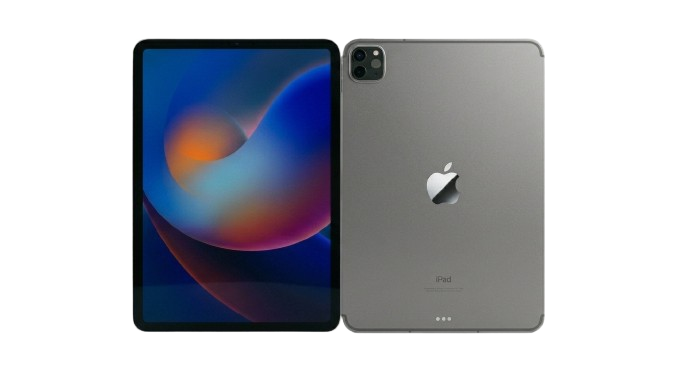
Technology has become a central part of organizing successful corporate events, exhibitions, and business conferences. From digital registration counters to interactive product demonstrations, portable devices help businesses improve efficiency and create engaging experiences. Choosing a reliable iPad rental company allows event organizers to access professional tablet solutions without making a significant investment in equipment that may only be needed temporarily.
Across the UAE, businesses increasingly rely on flexible technology rentals to support conferences, trade shows, employee training, and promotional campaigns. Understanding what to look for in a rental provider can help organizations select suitable devices, manage event requirements, and avoid unnecessary operational complications.
Why Businesses Need a Professional iPad Rental Company
Corporate events often require multiple devices that perform consistently throughout a busy schedule. Purchasing tablets for temporary use can increase capital expenses, create storage requirements, and leave businesses responsible for ongoing device maintenance.
Working with an experienced iPad rental company offers a more flexible approach. Businesses can select devices based on their event requirements, determine the necessary rental period, and request technical assistance when needed.
Professional tablet rental services can also simplify event preparation. Rather than configuring every device individually, organizers can arrange for tablets to be updated, loaded with relevant applications, and prepared before delivery.
This approach is particularly useful for companies managing large exhibitions, corporate conferences, or simultaneous events at multiple venues.
Reduced upfront technology costs
Renting eliminates the need to purchase a large inventory of tablets for occasional business activities. Organizations can allocate more of their event budget toward marketing, venue arrangements, and attendee experiences.
Flexible rental durations
Some businesses need devices for a single conference, while others require tablets for several weeks of training or promotional activities. Flexible rental terms allow companies to match equipment availability with their project timelines.
Simplified device management
Managing dozens of tablets involves software updates, application installation, troubleshooting, and equipment tracking. A professional rental provider can help coordinate these requirements, depending on the agreed service.
Common Business Applications for iPad Rental Services
iPads serve several purposes beyond basic internet browsing. Their portability, touchscreen interfaces, and compatibility with business applications make them practical tools for different corporate environments.
Digital event registration and check-in
Traditional paper-based registration can create long queues, particularly when hundreds of attendees arrive within a short period. Tablet-based check-in systems allow event staff to search attendee records, verify registrations, and update visitor information through suitable event management software.
Some registration platforms also support QR code scanning and digital badge workflows when the appropriate software and compatible equipment are available.
Trade shows and exhibitions
Exhibitors need practical ways to present information without overcrowding their stands with printed brochures or desktop computers. iPads can display interactive catalogs, digital presentations, promotional videos, and product specifications. Sales representatives can use them to guide visitors through offerings and record inquiries.
For larger exhibitions, multiple devices can support different demonstration stations while maintaining a consistent visitor experience.
Corporate training and workshops
Organizations regularly conduct workshops, onboarding sessions, and professional development programs. Providing participants with tablets can simplify access to training materials, digital exercises, questionnaires, and collaborative applications.
Instead of asking employees to bring personal devices, companies can arrange equipment with consistent software configurations for scheduled training activities.
Customer surveys and feedback collection
Collecting attendee feedback helps organizers evaluate event performance and identify opportunities for improvement. Tablets can support digital questionnaires, satisfaction surveys, and customer research forms. Responses entered through an appropriate application can be stored electronically, reducing manual data entry and making information easier to review.
Product launches and promotional campaigns
Interactive technology can make product presentations more engaging. Marketing teams can use rented iPads to demonstrate product features, display promotional content, capture customer interests, and support digital lead generation.
These capabilities are especially useful for temporary retail activations, brand exhibitions, and promotional events.
Types of iPads Available for Corporate Rental
Different business activities require different device capabilities. Selecting the appropriate iPad model helps balance performance, portability, and rental expenses.
Standard iPads
Standard iPads are practical for general business applications such as registration, surveys, presentations, and training. Their familiar interface makes them suitable for events where visitors or staff need straightforward access to digital information.
iPad Air
The iPad Air offers a balance of portability and performance, making it suitable for interactive demonstrations, corporate applications, and professional presentations. It can be a useful option when teams need capable devices without choosing larger premium models.
iPad Pro
iPad Pro models are designed for more demanding workflows, including detailed visual presentations, creative applications, and interactive product demonstrations.
Their larger display options and processing capabilities can be valuable for businesses presenting high-resolution content or using resource-intensive software.
iPad Mini
The compact design of the iPad Mini makes it convenient for mobile staff working across busy event venues. These devices can be particularly useful for visitor assistance, mobile registration, inventory checks, and quick access to operational information.
The final selection should consider application compatibility, screen size, expected usage, and the number of devices required.
Essential Features to Consider When Choosing an iPad Rental Company
Not every tablet rental provider offers the same level of service. Evaluating a few operational factors before booking can help businesses avoid problems during important events.
Device availability and bulk rental capacity
Large conferences and exhibitions may require dozens or even hundreds of tablets. Businesses should confirm whether the provider can supply the required quantity of compatible devices for the scheduled dates.
Consistency matters when multiple participants need access to the same applications, particularly during training sessions and coordinated registration activities.
Preconfigured applications and software
Preparing rental devices before an event can reduce setup work at the venue. Ask whether the provider can install approved applications, adjust device settings, and prepare tablets according to business requirements. Software licensing, user accounts, and data access permissions should also be clarified before deployment.
Delivery and collection arrangements
Event organizers often operate under strict venue schedules. A reliable provider should communicate delivery arrangements, collection procedures, setup requirements, and any applicable transportation charges.
Confirming these details early helps prevent unnecessary disruption during installation and event breakdown.
Technical support and troubleshooting
Even carefully planned events can encounter unexpected technical issues. Ask whether remote assistance, on-site technicians, or replacement devices can be arranged and whether additional charges apply.
For business-critical registration systems, having a clear support plan is especially important.
Optional accessories and connectivity
Certain event applications may require tablet stands, protective cases, charging equipment, or mobile connectivity. These requirements should be discussed individually because accessories and connectivity services are not necessarily included in the standard tablet rental price.
Floor stands, desktop mounts, and other specialized equipment may be available as optional rental extras.
How iPad Rentals Work Alongside Other Event Technologies
Modern corporate events rarely depend on a single type of device. A coordinated technology setup may involve tablets for visitor interaction, laptops for event management, and large displays for presentations.
Understanding how these systems work together helps businesses create more organized event environments.
MacBook Pro rentals for professional workflows
Although iPads are suitable for many attendee-facing activities, some business operations require desktop applications, advanced creative software, or more demanding computing resources.
For instance, production teams may need laptops for editing presentations, managing multimedia content, or handling professional design tasks.
Organizations looking to rent MacBook Pro Abu Dhabi can explore short-term laptop rental options that complement tablet-based event operations.
A combination of iPads and MacBooks can support different responsibilities. Registration staff might use tablets, while event coordinators use laptops to manage schedules, presentation files, and administrative workflows.
Choosing suitable devices for each responsibility can improve operational efficiency without requiring organizations to purchase additional equipment.
LED video walls for audience engagement
Large displays serve a different purpose from handheld tablets. While iPads support individual interactions, LED video walls allow organizers to present information to larger audiences.
Businesses arranging a video wall rental for event activities can use LED displays for conference presentations, exhibition visuals, promotional videos, and event announcements.
For example, an exhibition booth might feature an LED video wall displaying a product campaign, while visitors use nearby iPads to explore detailed specifications.
Similarly, conference organizers may use a large screen for keynote presentations and tablets for digital agendas, surveys, or attendee registration. Coordinating these technologies can create a more connected event experience.
How Much Does It Cost to Rent iPads in the UAE?
iPad rental pricing varies according to the specific requirements of each project. Businesses should compare detailed quotations rather than assuming that every rental includes identical equipment and services.
The main factors affecting rental costs include:
- Device model: Standard iPads, iPad Air, iPad Mini, and iPad Pro models may have different rental rates.
- Rental duration: Daily, weekly, and longer-term arrangements can influence the overall price.
- Quantity: Bulk device requirements may qualify for customized commercial quotations.
- Delivery location: Transportation and collection costs may vary according to the venue.
- Configuration requirements: Application installation and specialized device preparation may affect pricing.
- Additional equipment: Stands, protective accessories, connectivity services, and other optional extras may increase the total cost.
- Technical support: Dedicated on-site assistance may involve additional service charges.
Before finalizing a rental agreement, request a written quotation showing equipment quantities, service inclusions, rental dates, and applicable additional charges.
This makes it easier to compare suppliers and establish a realistic event technology budget.
Benefits of Renting iPads Instead of Purchasing Them
The decision between renting and buying depends largely on how frequently a business uses tablets.
For organizations hosting occasional conferences, seasonal marketing campaigns, or temporary training programs, renting can offer several operational advantages.
- First, it reduces the need to invest in equipment that may remain unused for much of the year.
- Second, companies can choose different iPad models for different projects rather than relying on an existing inventory that may not meet every requirement.
- Third, rentals can reduce long-term responsibilities associated with storage, routine maintenance, and eventual equipment replacement.
However, purchasing may be more economical for organizations that use the same tablets continuously throughout the year. Businesses should evaluate total ownership costs, utilization rates, support requirements, and project frequency before making a decision.
Questions to Ask Before Booking an iPad Rental Service
A clear rental brief helps providers recommend suitable devices and prepare an accurate quotation.
Before confirming an order, event organizers should establish the following information:
- How many devices are required? Calculate the number of registration stations, presentation areas, employees, and attendee-facing activities.
- Which applications will be used? Confirm compatibility with the selected iPad models and operating systems.
- Where will the devices be deployed? Provide accurate venue details and access instructions.
- How long will the equipment be needed? Include setup, testing, event operation, and collection periods.
- Will internet connectivity be available? Determine whether venue Wi-Fi is sufficient or additional connectivity is necessary.
- Are accessories required? Identify stands, cases, charging equipment, and other optional items in advance.
- What happens if a device develops a fault? Clarify troubleshooting arrangements, replacement availability, and support response procedures.
Answering these questions reduces uncertainty and makes equipment planning more efficient.
Why Local Experience Matters for iPad Rentals in the UAE
Event organizers in Dubai, Abu Dhabi, Sharjah, and other Emirates often work with strict schedules and venue-specific requirements.
A rental company familiar with local event operations may be better equipped to coordinate equipment delivery, installation access, and collection arrangements.
Local availability can also simplify communication when organizers need assistance with device quantities, technical requirements, or scheduling changes.
For businesses managing several events across the UAE, consistent equipment specifications and coordinated delivery planning can be especially valuable.
The goal is not simply to obtain tablets. It is to ensure that the required technology is ready when event staff and attendees need it.
Final Thoughts
Selecting the right iPad rental company involves more than comparing device prices. Businesses should consider equipment compatibility, rental flexibility, device preparation, delivery arrangements, and available technical support.
Whether organizing a trade show in Dubai, a corporate conference in Abu Dhabi, or a training workshop in Sharjah, carefully planned tablet rentals can help simplify operations and support digital engagement.
Providers such as Hire Tablets UAE offer iPad rental solutions for corporate events, exhibitions, conferences, and business projects. By defining equipment requirements early and evaluating the available services, organizations can choose a technology rental arrangement that meets their operational needs without unnecessary purchasing commitments.
Frequently Asked Questions
What is the best iPad model for corporate events?
The best model depends on the intended application. Standard iPads are generally suitable for registration and surveys, while iPad Pro models may be preferable for demanding presentations or creative applications. The iPad Mini is useful for mobile event staff.
Can businesses rent iPads in bulk for conferences?
Yes. Commercial tablet rental providers can offer bulk rental arrangements for conferences, exhibitions, training sessions, and corporate events. Availability should be confirmed according to the required quantity, model, and rental dates.
Can rented iPads be configured with business applications?
Many professional rental services offer device configuration and application installation. Businesses should provide their software requirements in advance and confirm any licensing, account access, or additional setup charges.
Are iPad stands included with tablet rentals?
Not necessarily. Floor stands, desktop stands, and other accessories may be available as optional rental items. Businesses should confirm which equipment is included in the quotation and which items carry additional costs.
How early should businesses book iPads for an event?
Booking several weeks ahead is advisable for large events, particularly when specific models or substantial device quantities are required. Smaller orders may be possible with shorter notice, depending on availability.
Can iPads be used for exhibition lead generation?
Yes. With suitable software, rented iPads can support digital forms, visitor surveys, product demonstrations, and lead capture. Organizers should also ensure that personal information is collected and handled in accordance with applicable privacy requirements.


Artificial Intelligence (AI) is transforming the modern world by changing how businesses operate, professionals work, and people solve everyday problems. From automated customer support and content creation to data analysis and machine learning, AI is creating exciting opportunities across different industries. As demand for AI-related skills continues to grow, learning artificial intelligence has become an excellent step toward building a successful career. For students, freelancers, and professionals in Faisalabad, choosing the Best AI Course in Faisalabad can be a valuable investment in their future.
Why Learn Artificial Intelligence?
Artificial Intelligence is one of the most promising technology fields, offering opportunities in education, healthcare, marketing, software development, business management, and many other sectors. Understanding AI tools and technologies can help individuals improve productivity, develop creative solutions, and stay competitive in the digital job market.
Learning AI is not limited to programmers or IT professionals. Students, entrepreneurs, content creators, digital marketers, and freelancers can also benefit from practical AI knowledge. With the right training, beginners can understand how AI works and learn to use modern tools for real-world tasks.
Choose the Best AI Course in Faisalabad
Selecting the right training program is an important part of starting your AI journey. A quality course should provide a clear understanding of artificial intelligence concepts while focusing on practical applications. Students should look for training that covers modern AI tools, prompt engineering, automation, content generation, and productivity techniques.
The Best AI Course in Faisalabad should also offer hands-on practice, expert guidance, and opportunities to work on practical projects. These learning experiences help students develop confidence and understand how artificial intelligence can be applied in different professional environments.
What Can You Learn in an Artificial Intelligence Course in Faisalabad?
A professional Artificial Intelligence Course in Faisalabad can introduce students to several important AI concepts and applications, including:
- Introduction to AI: Understand artificial intelligence, its applications, and its role in modern industries.
- AI Tools and Applications: Explore popular AI-powered tools for writing, designing, research, and productivity.
- Prompt Engineering: Learn how to write effective prompts to get better results from AI platforms.
- AI Content Creation: Use AI tools to generate ideas, written content, images, and other creative materials.
- Business Automation: Understand how AI can simplify repetitive tasks and improve business workflows.
- Practical Projects: Apply your knowledge through real-world exercises and assignments.
These skills can help learners use AI more effectively in their studies, businesses, freelance projects, and professional careers.
Why Enroll in an AI Training Institute in Faisalabad?
Learning from a professional AI Training Institute in Faisalabad can make the learning process easier and more effective. Experienced instructors can guide students through complex topics, explain practical applications, and help them understand emerging technologies.
A structured learning environment also allows students to practice regularly, ask questions, and develop their skills step by step. Instead of relying only on online tutorials, learners can benefit from organized lessons and direct guidance.
When selecting an institute, consider its course outline, teaching approach, practical training opportunities, and learning support.
Career Opportunities After Learning AI
Artificial intelligence skills can support career development in several fields. Depending on their interests and additional expertise, trained individuals may explore opportunities such as:
- AI-assisted content creation
- Digital marketing and SEO
- AI-powered graphic design
- Business process automation
- Freelancing and remote services
- Data analysis and research support
- AI-assisted web development
Although completing a course does not guarantee employment, developing practical AI skills can improve professional capabilities and help individuals explore new income opportunities.
Professional AI Courses in Faisalabad for Future-Ready Skills
Enrolling in Professional AI Courses in Faisalabad can help students prepare for a technology-driven future. A well-designed training program should balance theoretical knowledge with practical exercises so learners can understand not only what AI is but also how to use it effectively.
Beginners should start with fundamental concepts and gradually move toward advanced tools and applications. Consistent practice, experimentation, and continuous learning are essential because artificial intelligence technologies are constantly evolving.
Start Learning with Center for Skills (C4S)
For individuals looking to develop modern technology skills, Center for Skills (C4S) in Faisalabad is an option worth exploring. The institute focuses on professional skills development and practical training to help students prepare for changing industry requirements.
Students interested in artificial intelligence can explore the available training opportunities at C4S and learn more about its programs, course details, and admission information.
Visit the official website: center4skills.com
Located in Faisalabad, Pakistan, Center for Skills aims to support learners who want to improve their knowledge, develop practical abilities, and explore opportunities in the digital world.
Conclusion
Artificial Intelligence is shaping the future of technology, business, and professional development. Learning how to use AI tools and understand their applications can give students and professionals valuable skills for the modern workplace. If you want to enter this growing field, researching the Best AI Course in Faisalabad is a great starting point. With professional guidance, practical learning, and consistent effort, you can begin your AI journey and prepare yourself for emerging opportunities in the digital economy.

Hajj 2027: A Complete Guide to Preparing for Your Pilgrimage

Custom Cosmetic Boxes Trends: Modern Unboxing for Beauty Brands

Parchment Paper Cookie Bags | Greaseproof, Bulk USA

Travel Agency Software: How Modern Tools Improve Business Management

Where to Buy an Authentic Chanel Timeless Bag UAE: A Complete Shopping Guide

Rani No Hajiro in Ahmedabad: A Complete Guide to History, Shopping & Hidden Secrets

Digital Marketing for Beginners: Step-by-Step Guide to Start and Succeed in 2026

How to Get Promoted Faster at Work: Smart Career Growth Tips

Dublin City University: Everything You Need to Know Before Applying in 2026