Fashion
Designer Fabric: Elevating Fashion and Interior Design

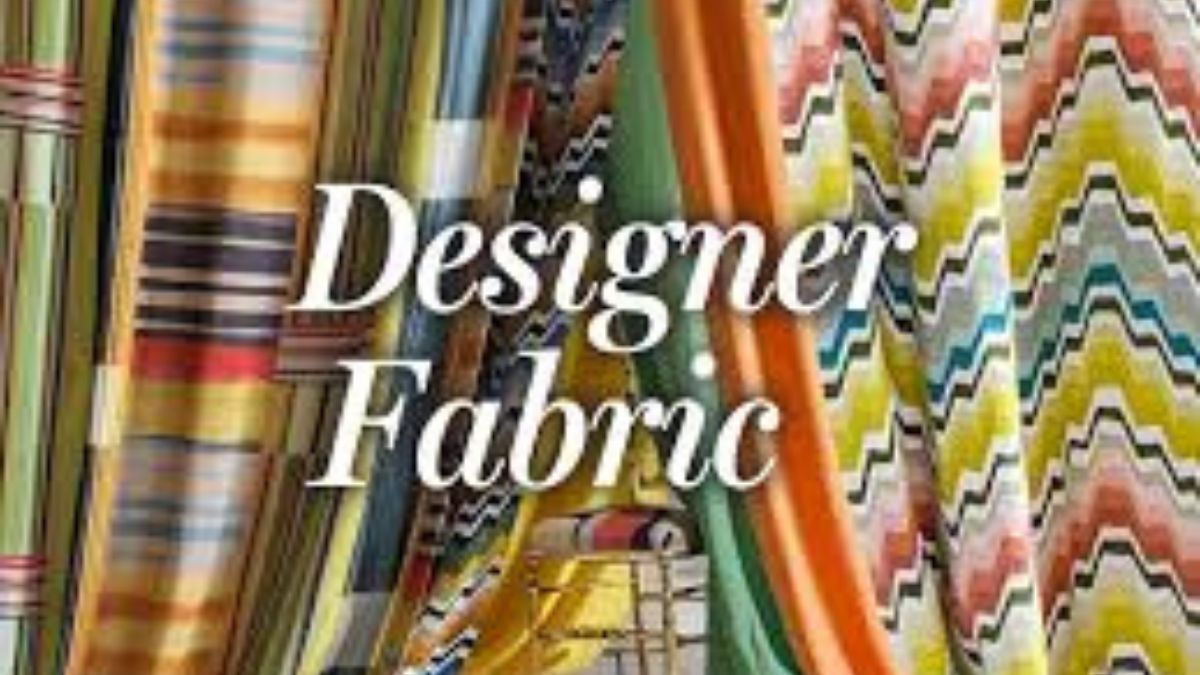
Designer fabric plays a crucial role in the realms of fashion and interior design, symbolizing the pinnacle of creativity, luxury, and innovation. These fabrics, meticulously crafted with premium materials and unique patterns, set the stage for breathtaking garments and sophisticated home decor. From the runways of Paris to the elegant living rooms of Manhattan, designer fabrics are synonymous with quality and style.
The Essence of Designer Fabric
Designer fabric is characterized by its superior quality, intricate designs, and exclusivity. Unlike mass-produced materials, these fabrics are often made in limited quantities, ensuring their uniqueness. Designers and brands put extensive effort into selecting the finest fibers, such as silk, cashmere, and high-grade cotton, to create textiles that stand out in both feel and appearance.
Types of Designer Fabrics
Silk
Renowned for its luxurious feel and shimmering appearance, silk is a staple in high-end fashion and interior design. Its natural sheen and ability to drape beautifully make it a favorite for evening gowns, curtains, and upholstery.
Cashmere
Soft, warm, and incredibly lightweight, cashmere is prized for its comfort and elegance. It is commonly used in sweaters, scarves, and throws, adding a touch of sophistication to any wardrobe or living space.
Linen
Known for its breathability and texture, linen is ideal for both clothing and home textiles. Its natural, slightly wrinkled look exudes a relaxed yet refined charm, making it perfect for summer outfits and casual chic interiors.
Velvet
With its plush texture and rich colors, velvet brings opulence to any design. This fabric is often used in evening wear, decorative pillows, and furniture upholstery, creating a sense of grandeur and comfort.
The Role of Designer Fabrics in Fashion
In the fashion industry, designer fabrics are the canvas upon which designers paint their visions. These fabrics dictate the flow, structure, and overall aesthetic of a garment. High-end designers, such as Chanel, Gucci, and Dior, rely on exclusive fabrics to create their iconic collections. The unique patterns, textures, and colors of these fabrics enable designers to craft pieces that are not only beautiful but also timeless.
Designer fabrics also play a pivotal role in the sustainable fashion movement. Many designers are now opting for ethically sourced and eco-friendly materials, ensuring that luxury does not come at the expense of the environment. This shift towards sustainability is leading to the development of innovative fabrics, such as organic cotton, bamboo silk, and recycled polyester, which maintain high standards of quality and design.
Designer Fabrics in Interior Design
In interior design, fabrics are key elements that define the ambiance and style of a space. From draperies and upholstery to cushions and wall coverings, designer fabrics bring a sense of elegance and personality to interiors.
High-end fabrics are often used to create bespoke pieces that reflect the homeowner’s taste and lifestyle. For instance, custom-made curtains in a rich brocade fabric can add a touch of drama to a living room, while a velvet-upholstered sofa can serve as a luxurious centerpiece. Interior designers frequently collaborate with fabric houses to select materials that complement their vision, ensuring a cohesive and sophisticated look.
The Art of Choosing Designer Fabric
Selecting the right designer fabric involves a keen understanding of both aesthetics and functionality. Considerations such as color, pattern, texture, and durability are crucial in ensuring that the fabric enhances the overall design while meeting practical needs. For fashion, the fabric must complement the design and fit the intended occasion, whether it’s an elegant evening dress or a casual daytime outfit. In interior design, the fabric must withstand wear and tear while maintaining its beauty and appeal.
Conclusion
Designer fabrics are the heart and soul of fashion and interior design. They embody luxury, creativity, and innovation, transforming ordinary designs into extraordinary works of art. Whether adorning a runway model or a living room sofa, these fabrics set the standard for elegance and sophistication. As the industry continues to evolve, designer fabrics will undoubtedly remain at the forefront, inspiring and captivating designers and consumers alike.




In today’s busy lifestyle, many people are becoming more conscious about what they use on their skin and hair. Instead of choosing products only because of attractive packaging or strong marketing claims, consumers are increasingly interested in simple formulas, familiar ingredients, and gentle everyday care. This growing interest has made Natural Herbal Products a popular choice for people who want to bring nature-inspired solutions into their personal care routines.
Herbal skincare is not simply about following a trend. For many people, it is about choosing products that fit comfortably into their daily lifestyle. Plant-based ingredients, botanical extracts, nourishing oils, and naturally inspired formulations can add a different dimension to everyday beauty care. Ecoxent offers skincare and personal-care options that can be incorporated into routines focused on nourishment, hydration, and healthy-looking skin.
Why People Are Choosing Herbal-Based Skincare
The beauty industry has changed considerably in recent years. People now pay closer attention to product ingredients and often look for alternatives that feel more aligned with their personal preferences. This has increased interest in botanical skincare, herbal beauty products, and plant-inspired personal care.
One reason herbal products appeal to consumers is their connection with familiar natural ingredients. Ingredients such as aloe vera, botanical extracts, plant oils, and herbal components have long been associated with traditional beauty routines.
However, choosing a product simply because it contains the word “herbal” is not enough. It is still important to consider the complete formulation, how the product suits your skin, and how consistently you use it.
Understanding Natural Herbal Products
Natural Herbal Products generally refers to personal-care products that incorporate herbs, plants, botanical extracts, or other naturally inspired ingredients. Depending on the product, they may be created for skincare, haircare, cleansing, moisturizing, or general beauty routines.
The exact benefits depend on the ingredients and formulation. Some products may focus on hydration, while others are designed for cleansing, nourishment, or maintaining a healthy-looking appearance.
For this reason, consumers should read product information carefully and choose products according to their individual needs rather than expecting every herbal product to provide the same results.
The Role of Botanical Ingredients
Botanical ingredients have a long history in personal care. Aloe vera, for example, is commonly used in moisturizing and soothing skincare formulations. Plant oils can help provide emollient properties, while certain botanical extracts are included to complement a product’s overall formulation.
Modern skincare combines these traditional ingredients with contemporary formulation techniques. The result can be products that are easy to use and fit naturally into modern routines.
Ecoxent focuses on beauty and personal-care products that can become part of everyday skincare habits. Whether someone is looking for a cleanser, moisturizer, serum, soap, or haircare product, having a consistent routine is often more important than using a large number of products.
Benefits of a Nature-Inspired Beauty Routine
A simple beauty routine can make personal care easier and more consistent. Products featuring botanical ingredients may appeal to people who prefer nature-inspired skincare and want to explore plant-based options.
A well-planned routine can support several basic skincare goals:
- Maintaining skin hydration
- Keeping the skin feeling soft and comfortable
- Supporting a clean and refreshed appearance
- Nourishing dry or rough-feeling areas
- Maintaining a consistent skincare routine
- Caring for hair and scalp as part of personal hygiene
These goals are practical and realistic. Good skincare is usually about regular care rather than relying on a single product to solve every concern.
Choosing the Right Herbal Products
With so many choices available, selecting a suitable product can sometimes feel confusing. The best approach is to start with your own needs.
If your skin tends to feel dry, you may prefer moisturizing products. If you want everyday cleansing, a suitable herbal soap or face wash may be more appropriate. For haircare, you might look for shampoos, oils, or serums designed around your particular hair needs.
When exploring Natural Herbal Products, always check the ingredient list and product directions. If you have sensitive skin or known allergies, pay particular attention to ingredients that may cause irritation.
It is also useful to introduce new products gradually. This makes it easier to understand how your skin responds instead of changing several products at the same time.
Ecoxent and Everyday Personal Care
Ecoxent provides a range of beauty and skincare products designed for different aspects of personal care. The brand can be a useful option for people who want to build a straightforward routine around cleansing, moisturizing, nourishing, and maintaining healthy-looking skin.
A good routine does not have to contain dozens of products. A cleanser, moisturizer, and targeted treatment may be enough for many people. Haircare can be added separately according to individual requirements.
The key is to choose products that you can use consistently and that suit your skin and lifestyle.
Herbal Skincare for Different Routines
Everyone’s skincare routine is different. Age, environment, lifestyle, skin type, and personal preferences can all influence product choices.
Someone living in a dry environment may prioritize hydration, while another person may focus more heavily on cleansing. People who spend significant time outdoors may also pay closer attention to maintaining their skin’s comfort and appearance.
This is where Natural Herbal Products can fit into a personalized routine. Rather than following a complicated beauty schedule, consumers can select nature-inspired products that address their everyday personal-care needs.
For example, a gentle cleanser can be used to remove daily buildup, followed by a moisturizer to help maintain hydration. Hair oils and herbal shampoos can similarly become part of a regular haircare schedule.
Why Consistency Matters
One of the biggest mistakes people make with skincare is constantly changing products. A routine needs time and consistency. Applying a moisturizer once and expecting a dramatic transformation is unrealistic.
Regular cleansing, moisturizing, adequate hydration, and sensible product selection can help support healthy-looking skin over time. The same principle applies to haircare.
If you choose an herbal skincare product, use it according to its directions and give your routine enough time to become a habit. Consistency makes personal care simpler and easier to maintain.
Natural Does Not Always Mean Suitable for Everyone
The term “natural” can sound reassuring, but natural ingredients can still cause irritation or allergic reactions in some people. Essential oils and botanical extracts, for example, may not suit everyone.
That is why responsible skincare involves reading labels and understanding what you are applying to your skin. If you have a known sensitivity, check the ingredients before use. When necessary, consider a patch test or seek advice from a qualified skincare professional.
The goal should not simply be to choose something because it is natural. Instead, look for a product that combines appropriate ingredients, good formulation, and suitability for your personal needs.
Building a Simple Herbal Beauty Routine
Creating a nature-inspired skincare routine does not have to be complicated. Start with the basics and build gradually.
Morning: Begin with a suitable cleanser, followed by a moisturizer. If you are going outdoors, sunscreen should also be part of your routine.
Evening: Cleanse the skin to remove dirt, excess oil, and daily buildup. Follow with your preferred moisturizer or targeted skincare product.
Haircare: Choose shampoo, conditioner, hair oil, or serum according to your hair type and concerns. Avoid excessive product use and focus on maintaining a consistent routine.
This simple approach allows Natural Herbal Products to become part of everyday care without making skincare feel overwhelming.
A More Thoughtful Approach to Beauty
Modern consumers are becoming more thoughtful about their beauty choices. They want products that fit their lifestyles, have understandable ingredients, and offer practical benefits.
Herbal and botanical skincare can be an appealing option for people who enjoy nature-inspired beauty products. At the same time, making informed choices is essential. Product quality, formulation, skin compatibility, and proper usage all matter.
Ecoxent supports this approach by offering personal-care products that can be incorporated into simple daily routines. Whether your focus is skincare, haircare, cleansing, or hydration, choosing products carefully can make your routine more enjoyable.
Final Thoughts
The popularity of Natural Herbal Products reflects a broader interest in simple, nature-inspired approaches to personal care. Botanical ingredients and herbal formulations can complement everyday skincare and haircare routines, particularly for people who appreciate products inspired by nature.
Ecoxent offers options for consumers looking to create practical beauty routines focused on cleansing, hydration, nourishment, and healthy-looking skin and hair. The most important step is to understand your individual needs, check product ingredients, and remain consistent with your routine.
Natural-inspired beauty does not need to be complicated. With thoughtful product choices and regular care, you can create a skincare and personal-care routine that feels simple, comfortable, and easy to maintain.


A cashmere sweater is often viewed as one of the most luxurious and versatile pieces a person can add to their wardrobe. Known for its exceptional softness, lightweight warmth, and timeless appeal, cashmere has remained a favorite among fashion enthusiasts for generations. However, not every cashmere sweater offers the same level of quality, comfort, or value. With so many options available online and in stores, shoppers can easily feel overwhelmed when trying to determine which sweater is worth the investment.
The truth is that buying cashmere requires more than simply reading the label or choosing the most expensive option. Several factors influence the quality and longevity of a sweater, including fiber composition, construction, fit, weight, craftsmanship, and overall design. Understanding these elements can help consumers make smarter purchasing decisions and avoid common mistakes. Whether you are buying your first cashmere sweater or adding another piece to an existing collection, this guide will help you identify what truly matters before making a purchase. For anyone considering Luxury Cashmere Sweaters, knowing how to evaluate quality can make the difference between a sweater that lasts for years and one that disappoints after only a few wears.
Understand What Cashmere Really Is
Before evaluating a sweater, it helps to understand what makes cashmere different from other knitwear materials. Cashmere comes from the fine undercoat of cashmere goats. These fibers are prized because they are significantly softer and lighter than many traditional wool fibers while still providing impressive insulation.
The unique structure of cashmere fibers allows them to trap warmth efficiently without creating excessive bulk. This is one reason cashmere sweaters feel comfortable in a variety of climates and situations. Unlike heavier winter garments, cashmere provides warmth while maintaining an elegant and lightweight feel.
When shopping for Luxury Cashmere Sweaters, remember that cashmere itself is a premium material, but the quality of that material can vary considerably. Not all cashmere fibers are equal, and understanding this distinction is an important first step.
Always Check the Fiber Content Label
One of the most important things to examine before purchasing a cashmere sweater is the fiber content label. This label provides valuable information about what materials are actually used in the garment.
A sweater labeled as 100 percent cashmere contains only cashmere fibers according to applicable textile labeling standards. Other products may be labeled as cashmere blends, meaning cashmere has been combined with fibers such as wool, cotton, silk, or synthetic materials.
Neither option is automatically better or worse. The right choice depends on your preferences and intended use. However, understanding the composition helps ensure you know exactly what you are paying for. High-quality Luxury Cashmere Sweaters should always provide clear and transparent labeling.
Pay Attention to Fiber Quality
The quality of cashmere fibers plays a major role in determining how a sweater feels and performs over time. Factors such as fiber length and fineness influence softness, durability, and overall appearance.
Longer fibers generally contribute to stronger yarn construction and a smoother surface. Shorter fibers can sometimes lead to increased pilling and a less refined appearance after repeated wear. While shoppers may not always have access to detailed fiber specifications, reputable brands often provide information about the quality of their materials.
When comparing Luxury Cashmere Sweaters, look for brands that emphasize craftsmanship and material sourcing rather than relying solely on marketing language. Transparency often indicates greater confidence in product quality.
Evaluate the Softness Carefully
Many people judge cashmere primarily by touch. While softness is certainly important, it should not be the only factor influencing your decision.
A quality cashmere sweater should feel smooth, comfortable, and pleasant against the skin. However, some garments are treated during manufacturing to create an unusually soft initial feel that may not accurately reflect long-term performance.
Instead of focusing only on immediate softness, consider the overall balance of the fabric. Premium Luxury Cashmere Sweaters often feel naturally soft while maintaining structure and durability. A sweater that feels overly delicate or unusually slippery may not always provide the best long-term value.
Examine the Knit Construction
Construction quality can reveal a great deal about a sweater’s overall standard. Carefully inspect the knitting, seams, neckline, cuffs, and hem.
A well-made sweater should have consistent stitching throughout. The knit should appear even without loose threads or irregular sections. Seams should be clean and secure, and the garment should hold its shape without appearing distorted.
High-quality Luxury Cashmere Sweaters often demonstrate excellent attention to detail in these areas. While construction may not be as immediately noticeable as softness, it significantly affects comfort, appearance, and durability over time.
Consider the Weight of the Sweater
Cashmere sweaters are available in a wide range of weights. Some are designed to be lightweight layering pieces, while others provide substantial warmth for colder weather.
Lightweight cashmere works well for travel, office environments, and transitional seasons. Heavier cashmere sweaters often provide additional insulation and a more substantial feel.
Neither option is inherently superior. The best choice depends on your climate, lifestyle, and wardrobe needs. Many consumers find value in owning multiple Luxury Cashmere Sweaters in different weights to accommodate various seasons and occasions.
Understand the Importance of Fit
Even the finest cashmere cannot compensate for poor fit. A sweater should feel comfortable while complementing your body shape and personal style.
Pay attention to shoulder placement, sleeve length, body length, and overall proportions. The shoulders should sit naturally, sleeves should not feel restrictive, and the body should provide sufficient movement without appearing oversized.
Different sweater styles offer different fits. Crewnecks tend to provide a classic appearance, V necks offer layering flexibility, and turtlenecks create a more sophisticated look. Selecting the right fit is just as important as selecting the right material.
For shoppers investing in Luxury Cashmere Sweaters, fit often has a greater impact on satisfaction than any other single factor.
Check for Shape Retention Features
One common concern among cashmere buyers is whether a sweater will maintain its shape over time. Shape retention depends on several factors, including fiber quality, yarn construction, and garment design.
Examine the cuffs, neckline, and hem. These areas should feel resilient rather than excessively loose. Quality construction helps prevent stretching and distortion after repeated wear.
A sweater that maintains its shape not only looks better but also provides greater long-term value. This is particularly important when purchasing premium cashmere garments intended for frequent use.
Evaluate Color Choices Carefully
Color plays a significant role in determining how versatile a sweater will be within your wardrobe. While trendy shades may be appealing, classic colors often provide greater long-term value.
Neutral tones such as navy, gray, black, camel, and ivory remain among the most popular choices for Luxury Cashmere Sweaters because they pair easily with a wide variety of outfits. These colors also remain stylish regardless of seasonal trends.
If you are purchasing your first cashmere sweater, starting with a neutral shade can maximize versatility and wearability.
Look Beyond Brand Names
Well-known brands often have strong reputations, but brand recognition alone does not guarantee superior quality. Some lesser-known manufacturers produce exceptional cashmere garments that rival more expensive alternatives.
Instead of focusing exclusively on the label, evaluate the sweater itself. Examine the material composition, construction, fit, and design details. Reading customer reviews can also provide useful insights into real-world performance.
The best Luxury Cashmere Sweaters earn their reputation through quality and craftsmanship rather than marketing alone.
Consider Your Lifestyle Needs
The ideal cashmere sweater depends on how you plan to wear it. Someone seeking a travel-friendly layering piece may have different priorities than someone looking for a heavy winter sweater.
Think about where and how the sweater will be used. Will it primarily be worn to work, during travel, at social events, or for casual everyday activities? Understanding your needs can help narrow your options and prevent unnecessary purchases.
Choosing a sweater that aligns with your lifestyle increases the likelihood that it will become a frequently worn and appreciated part of your wardrobe.
Learn About Proper Care Requirements
Before purchasing a cashmere sweater, it is important to understand the care it requires. Cashmere is a premium material and benefits from thoughtful maintenance.
Most sweaters should be washed gently according to manufacturer instructions and stored folded rather than hung. Proper storage helps prevent stretching and protects the fibers from unnecessary wear.
Consumers investing in Luxury Cashmere Sweaters should view care as part of the ownership experience. A well-maintained sweater can remain beautiful and comfortable for many years.
Compare Value Instead of Price Alone
Many shoppers focus heavily on price, but value is often a more useful measure. A lower-priced sweater that loses its shape quickly may provide less satisfaction than a higher-quality garment that lasts for years.
Consider all aspects of the purchase, including material quality, construction, fit, versatility, and durability. A sweater that performs well across multiple seasons and occasions often represents a better investment regardless of its initial cost.
The goal should be finding a sweater that delivers the best overall combination of quality and functionality rather than simply selecting the cheapest or most expensive option.
Final Thoughts
Buying a cashmere sweater should be an enjoyable and informed experience rather than a confusing one. By understanding what to look for before making a purchase, consumers can confidently evaluate quality and identify garments that offer genuine long-term value.
From examining fiber content and construction to considering fit, weight, color, and care requirements, every detail contributes to the overall performance of a sweater. For shoppers interested in Luxury Cashmere Sweaters, taking the time to evaluate these factors carefully can lead to better purchasing decisions and greater satisfaction.
A quality cashmere sweater is more than just a fashionable item. It is a versatile wardrobe investment that can provide comfort, warmth, and timeless style for many years. By focusing on craftsmanship, quality materials, and practical value, you can select a sweater that becomes one of the most dependable and appreciated pieces in your collection.

Healthy, beautiful hair starts with the right care routine. Whether you want to manage dryness, reduce frizz, support a healthy scalp, or maintain smooth and shiny hair, choosing suitable haircare products can make a meaningful difference. With so many shampoos, conditioners, treatments, and styling products available, finding the right options can sometimes feel overwhelming. If you are looking to Buy Haircare Products in Kuwait, Hoor Beauty offers a convenient way to explore beauty and haircare essentials that fit different hair needs.
Understanding Your Haircare Needs
Before choosing a haircare product, it is important to understand your hair type and its current condition. Straight, wavy, curly, and coily hair can all require different approaches. Your scalp condition, hair texture, and daily styling habits also influence which products may work best for you.
For example, dry hair may benefit from moisturizing shampoos and nourishing conditioners, while oily scalps may need lightweight cleansing formulas. If your hair is frequently exposed to heat styling, a heat protectant can help support your haircare routine. Identifying your main concerns makes it easier to select products that complement your needs.
Choosing the Right Shampoo
Shampoo is one of the most important parts of a basic haircare routine. It helps cleanse the scalp and remove excess oil, dirt, and product buildup. However, the best shampoo depends on your hair and scalp requirements.
A moisturizing shampoo may be suitable for dry or rough hair, while a gentle cleansing formula can be useful for people who prefer a balanced daily routine. Those concerned about scalp buildup may look for clarifying options, while individuals with sensitive scalps may prefer mild formulas.
When shopping for haircare essentials, consider the ingredients, intended use, and how frequently you plan to wash your hair. A suitable shampoo should cleanse effectively without leaving your hair feeling unnecessarily dry or uncomfortable.
Why Conditioner Matters
Conditioner helps improve the feel and manageability of hair after cleansing. It can make hair feel softer, smoother, and easier to detangle. For many people, using conditioner regularly is an important step toward maintaining a comfortable haircare routine.
If your hair is dry or prone to tangling, a nourishing conditioner may help improve softness. Lightweight conditioners can be useful for hair that becomes weighed down easily. Applying conditioner mainly to the mid-lengths and ends can help provide care without making the scalp feel heavy.
For those planning to Buy Haircare Products in Kuwait, selecting a shampoo and conditioner that complement each other is a practical way to build a consistent routine.
Hair Masks and Deep Conditioning Treatments
Hair masks are popular among people who want to give their hair additional nourishment. These treatments are often used alongside regular shampoo and conditioner to help improve the appearance and feel of dry, dull, or damaged-looking hair.
A moisturizing hair mask may be useful for hair that feels rough or lacks softness. Repair-focused treatments are often chosen by people who regularly color, straighten, or heat-style their hair. The right product depends on your hair’s condition and the results you want from your routine.
It is also important to follow the product instructions. Using a treatment too frequently may not be necessary, especially if your hair is fine or easily weighed down.
Scalp Care Is an Important Part of Haircare
A healthy-looking haircare routine should not focus only on the lengths of your hair. The scalp also deserves attention because it is where hair grows. Scalp care products may help support cleansing, comfort, and a balanced routine.
Depending on your needs, you may explore scalp scrubs, scalp treatments, or gentle cleansing products. If you experience persistent itching, irritation, or unusual hair loss, it is best to seek advice from a qualified healthcare professional rather than relying only on cosmetic products.
Keeping your scalp clean and choosing products suited to your needs can help create a better foundation for your overall haircare routine.
Haircare Ingredients to Look For
Understanding common haircare ingredients can make shopping easier. Moisturizing ingredients such as glycerin, hyaluronic acid, and certain plant oils are often included in products designed to improve softness and hydration. Proteins and conditioning agents may be used in formulas intended to improve the feel of damaged or brittle-looking hair.
For frizz control, many people look for smoothing ingredients that help hair feel more manageable. If you are interested in scalp care, you may prefer products formulated with ingredients selected for cleansing and comfort.
Remember that ingredient preferences should be based on your individual needs. A product that works well for one person may not produce the same results for someone else.
Building a Simple Haircare Routine
A good haircare routine does not have to be complicated. Start with a suitable shampoo and conditioner, then add products according to your specific concerns. For example, a hair mask can be included when your hair needs extra nourishment, while a leave-in conditioner may help with detangling and softness.
If you use heat styling tools, consider adding a heat protectant. If you want to maintain a particular hairstyle, a suitable styling product may also be useful. The key is to choose products that serve a purpose rather than using too many products at once.
Consistency is often more important than having a large collection of haircare products. A simple routine that suits your hair can be easier to maintain over time.
Why Shop for Haircare Products at Hoor Beauty?
Finding suitable beauty products is easier when you can explore different options in one place. Hoor Beauty provides a convenient online shopping experience for customers looking for beauty and personal care essentials.
If you are planning to Buy Haircare Products in Kuwait, you can explore haircare options based on your hair type, preferred ingredients, and personal routine. Whether you are looking for shampoo, conditioner, hair treatments, or styling essentials, choosing products that match your needs can make your shopping experience more useful and focused.
It is always a good idea to read product descriptions carefully and check the recommended usage before making a purchase. This helps you choose products that fit your expectations and routine.
Haircare Tips for Everyday Use
Along with choosing suitable products, a few simple habits can support your haircare routine. Avoid washing your hair more frequently than necessary if it leaves your hair feeling dry. Use lukewarm water instead of very hot water, and gently towel-dry your hair rather than rubbing it harshly.
Regularly cleaning your hairbrush and avoiding excessive heat styling can also help maintain a neat and manageable appearance. If your hair is prone to tangling, use a suitable conditioner and detangle gently.
Protecting your hair from excessive sun exposure and environmental stress can also be helpful, especially when spending time outdoors.
Final Thoughts
Choosing the right haircare products is an important step toward maintaining healthy-looking, manageable hair. From shampoo and conditioner to hair masks and scalp treatments, every product can play a role in a well-planned routine. By understanding your hair needs and selecting suitable formulas, you can make your daily care routine more effective and enjoyable.
For anyone looking to Buy Haircare Products in Kuwait, Hoor Beauty is a convenient destination to explore beauty and haircare essentials. Visit Hoor Beauty to discover products that can complement your personal haircare routine and help you feel confident in your everyday beauty choices.
Гарніри з овочів до м’яса та риби: 10 ідей на будні
Чим цікавий сайт zabudovnik.kr.ua

NPI Number Search: How to Find and Verify a National Provider Identifier

Natural Herbal Products by Ecoxent – Simple Care Inspired by Nature

Bracknell Airport Transfer: A Convenient Way to Travel to and From the Airport

What You Need to Know About Cup Size Before Buying Your First Bra

Rani No Hajiro in Ahmedabad: A Complete Guide to History, Shopping & Hidden Secrets

Digital Marketing for Beginners: Step-by-Step Guide to Start and Succeed in 2026

How to Boost Organic Traffic with Garage2Global: A Step-by-Step Guide